
Amani Studio
Build any verification flow. No code required.
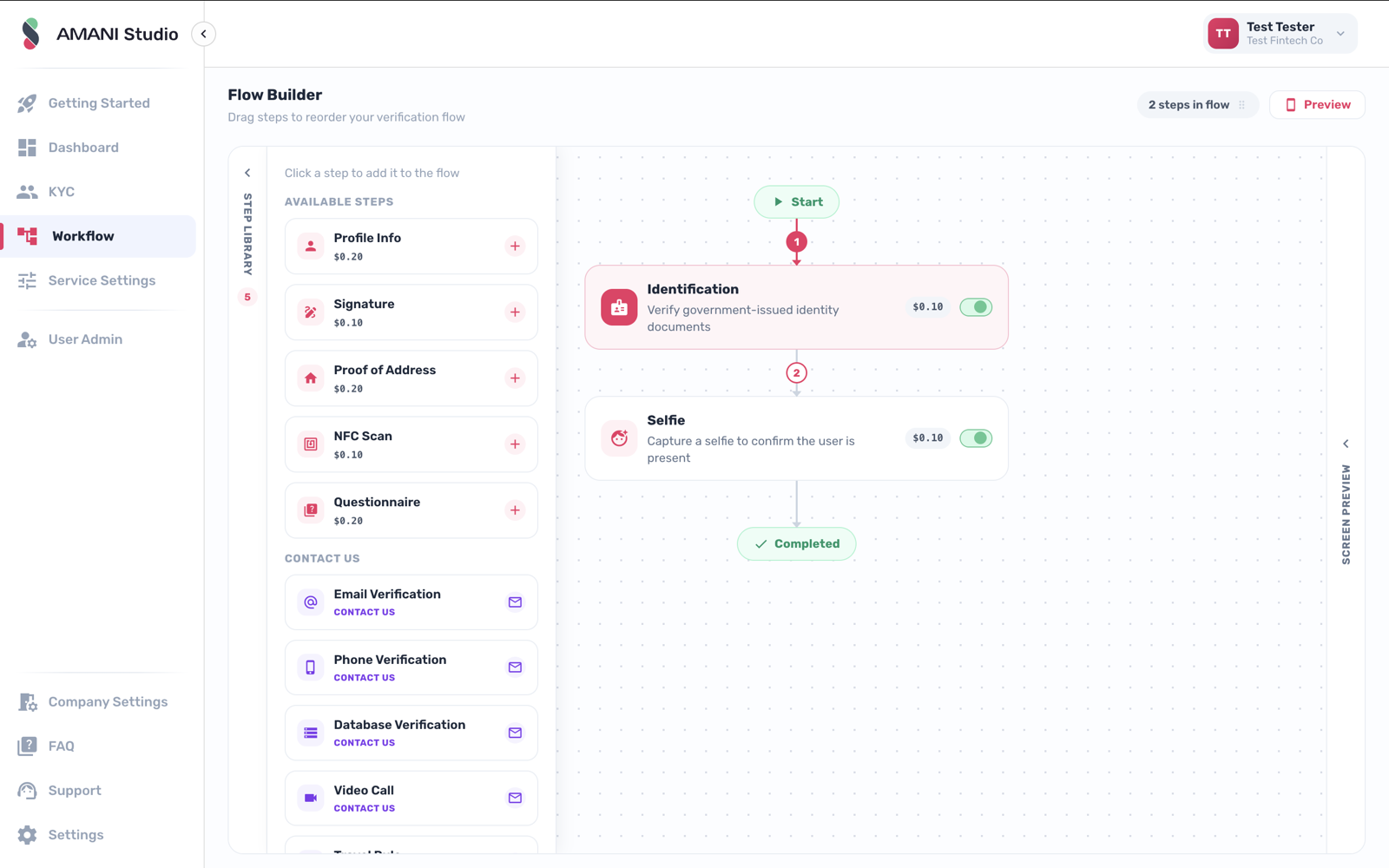
Studio is where Amani becomes yours. Drag modules into journeys, set thresholds and routing, brand every screen, work review queues, and migrate existing users in bulk - the whole platform, operated without a line of code.
Capabilities
What Amani Studio gives you.
Workflow Orchestrator
Visual journey builder: branch by country, risk tier or result; publish changes instantly with versioning.
Case Management
Review queues with side-by-side evidence, four-eyes approval, SLAs and a full audit trail.
White Label
Your logo, colours, fonts and domain across SDKs and hosted flows - Amani disappears behind your brand. On Compliance and Enterprise.
Bulk Upload & Data Migration
Bring existing verified users, galleries and watchlists across from your current provider in one managed import.
Team & permissions
Role-based access, maker-checker controls and per-team views for compliance, ops and engineering.
Analytics & audit
Conversion funnels, pass rates, review times and a regulator-ready log of every decision.
From session to signed result.
Four steps - the same integration pattern as every Amani module.
Create a session
One API call (or a Studio journey) starts a verification session for this module.
User completes the flow
Your customer is guided through capture in your branded UI - web or mobile.
Checks run in real time
Amani Studio executes alongside any other modules in the journey.
You receive a signed result
A webhook delivers the decision, scores and evidence to your backend.
For developers
Integrate Amani Studio.
Authenticate, create a profile, generate a verification URL - then let Amani handle the rest. Or describe what you want to your AI coding agent and let Amani Skills wire it up from the live docs.
Available on
verify.sh
# 1 · Authenticate (server-side only)
curl -X POST 'https://ae.amani.ai/api/v2/user/login/' \
  --form 'username="you@company.com"' \
  --form 'password="••••••••"'

# 2 · Create the customer profile
curl -X POST 'https://ae.amani.ai/api/v2/profile' \
  -H 'Authorization: Bearer $ACCESS_TOKEN' \
  --form 'id_card_number="784199012345678"' \
  --form 'name="Layla Haddad"'

# 3 · Generate the verification URL
curl -X POST 'https://ae.amani.ai/api/v2/profile/url' \
  -H 'Authorization: Bearer $ACCESS_TOKEN' \
  -H 'Content-Type: application/json' \
  --data '{
    "profile": PROFILE_ID,
    "web_sdk_url": "https://verify.amani.ai",
    "language": "en",
    "return_url": "https://yourapp.com/verified"
  }'

# Amani Studio runs inside this session - configure it in Amani Studio.
with Amani Skills
# Install Amani Skills once
npx -y github:AMANI-AI-ORG/skills --global

# Then ask your coding agent:

You › Set up an Amani verification workflow for our onboarding and connect the result webhook to our Node backend.

# The matching skill fetches the live docs, pins the
# current SDK version and wires up the integration -
# secrets left as placeholders. Claude Code, Cursor and
# any Agent-Skills-compatible tool.
webhooks.ts
// Amani signs every webhook with an HMAC signature using
// your secret. Always verify it before processing.
import crypto from 'node:crypto';

app.post('/webhooks/amani', (req, res) => {
  // Confirm the exact header name in the Webhooks API reference.
  const signature = req.get('X-Amani-Signature') ?? '';

  const expected = crypto
    .createHmac('sha256', process.env.AMANI_WEBHOOK_SECRET)
    .update(req.rawBody)
    .digest('hex');

  const valid =
    signature.length === expected.length &&
    crypto.timingSafeEqual(Buffer.from(signature), Buffer.from(expected));

  if (!valid) return res.status(401).end();

  const { profile, status } = req.body;
  if (status === 'approved') activateAccount(profile);

  res.status(200).end();
});
Amani Studio - common questions
Is Studio really included on every plan?
Yes - Studio, the workflow builder, the dashboard and SDKs ship on every plan, including Free. Full white-label UI comes with Compliance and Enterprise.
Can I change a live journey?
Journeys are versioned: edit in draft, test in sandbox, publish instantly, and roll back just as fast.
How does migration from another provider work?
Bulk import brings your verified users, face galleries and watchlists across without re-verifying anyone - our team manages the mapping on Enterprise plans.
Related modules
Add Amani Studio to your flow
Switch it on in Amani Studio, or call it directly from the API.